question.html
模板文件
所有 question.html 文件均使用 Mustache 模板引擎 进行处理,该引擎允许基本的 HTML 动态渲染。此外,它还支持:
- 渲染面板:这些面板控制学生查看问题、查看提交或查看正确答案时显示的内容。
- LaTeX:ZJUI-Learn 支持问题中的 LaTeX 方程。
question.html 的渲染面板
当向学生显示问题时,将在不同阶段显示三个“面板”:"question" 面板、"submission" 面板和 "answer" 面板。这些显示问题提示、学生提供的解决方案以及正确答案。
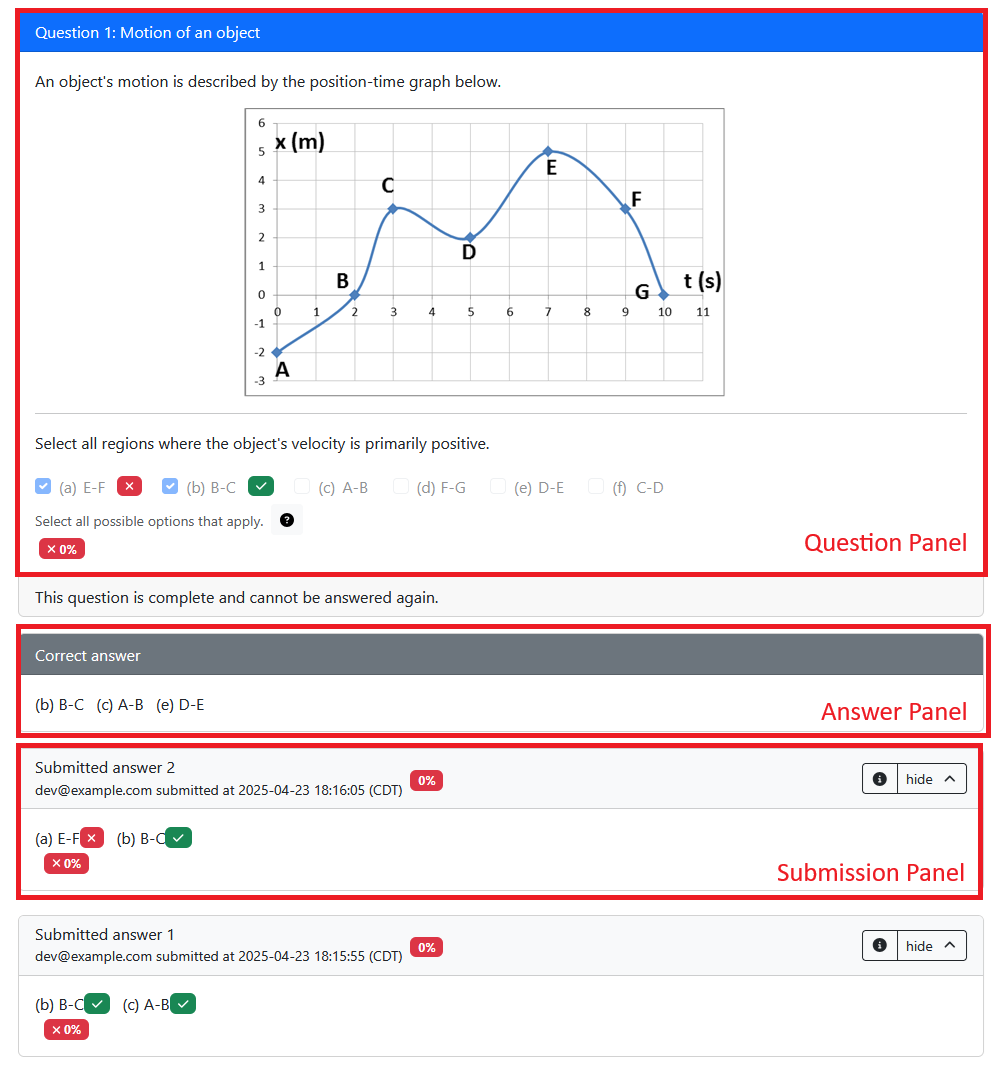
当问题首次向学生展示时,将显示 "question" 面板。每次学生保存答案时,都会显示 "submission" 面板;如果学生对同一变体提交多个答案,则可能有多个提交面板。根据问题/评估配置显示 "answer" 面板;默认情况下,当学生提交正确答案或尝试次数用完时,就会显示该信息。您可以查看生命周期图,了解有关这些面板如何显示的更多详细信息。
所有三个面板均基于相同的 question.html 模板显示,但元素在每个面板中的渲染方式不同。例如,<pl-number-input> 元素在“问题”面板中显示输入框,在“提交”面板中显示提交的答案,在“答案”面板中显示正确答案。
"question"面板
通过将 question.html 中的文本包裹在 <pl-question-panel> 元素 中,可以将其设置为仅显示在“问题”面板中。这对于问题提示很有用,不需要在“提交”和“回答”面板中重复。例如:
===“好”
```html
<pl-question-panel>
  <p>What is y, if y is 1 + 3?</p>
</pl-question-panel>
<pl-number-input answers-name="y" label="$y =$"></pl-number-input>
```
===“不好”
```html
<p>What is y, if y is 1 + 3?</p>
<pl-number-input answers-name="y" label="$y =$"></pl-number-input>
```

The question will be repeated in the "submission" and "answer" panels, which is unnecessary and can be confusing for students.
"submission"面板
默认情况下,当元素在“提交”面板中呈现时,会呈现元素 (data["partial_scores"][NAME]["feedback"]) 给出的反馈。您可以使用 pl-submission-panel 仅在“提交”面板中显示附加文本。例如:
===“好”
```html
<pl-submission-panel>
  <p>
    Feedback: {{feedback.y}}
  </p>
</pl-submission-panel>
```
===“不好”
```html
<p>Feedback: {{feedback.y}}</p>
```

This will show the feedback in the "question" and "answer" panels as well, which is unnecessary and can be confusing for students. Since `feedback.y` won't be defined until the student submits an answer, it will show as an empty string in the "question" panel, just showing `"Feedback: "`.
有关提供反馈的更多详细信息,请参阅server.py 页面。
"answer"面板
默认情况下,正确答案显示在“答案”面板中。可以通过在问题的 info.json 中设置 showCorrectAnswer: false 来禁用此功能。常见问题解答项目“当学生看到他们的评分结果时,如何隐藏正确答案?” 描述了一些隐藏正确答案的其他技术。
如果您使用自定义评分功能、外部评分者 或使用手动评分 对问题进行评分,我们鼓励您显示正确答案,以便学生可以在答案面板中看到它。如果有多个正确答案,您应该在 pl-answer-panel 元素中添加注释,表明任何正确答案都将被接受,显示的答案只是一个示例。您还可以在答案面板中显示其他文本,例如对正确答案的扩展解释。
小胡子模板
双花括号中的任何文本(例如 {{params.m}})都将使用 Mustache 替换为变量值。这些参数通常由问题的 server.py 定义。例如,如果在 server.py 中定义了 params["m"],则可以在 question.html 中使用它,如下所示:
<p>If m is {{params.m}}, what is {{params.m}} * 3?</p>
这将呈现为:
<p>If m is 5, what is 5 * 3?</p>
可用于 Mustache 模板的数据
当学生第一次查看问题变体时,parse 和 grade 尚未运行,因此这些函数在 data 中设置的值将不可用于模板。每个server.py函数对如何修改data对象都有限制,这些限制记录在server.py函数表中。例如,在generate阶段,只能修改data["params"]和data["correct_answers"]。
有关何时调用 server.py 函数的详细信息,请参阅问题生命周期图。请注意,后续阶段对 data 对象的任何修改(例如 parse 或 grade)都将被保留并用于问题的任何后续渲染。例如,如果 grade 函数在学生提交后更改了 data["params"],则在再次呈现问题时将使用更新后的 data["params"]。
高级渲染
您可以使用以下语法有条件地呈现一段 HTML:
{{#params.show}}
<p>This will only show up if params.show is true</p>
{{/params.show}}
您可以使用此语法来渲染字符串数组(. 表示数组中的当前项目):
{{#params.items}}
<p>{{.}}</p>
{{/params.items}}
!!! info “HTML 渲染”
默认情况下,Mustache 在使用双大括号 (`{{params.x}}`) 时转义特殊字符。这可确保任何可能包含 HTML 使用的字符(例如引号或 `<` 字符)的内容都在其原始上下文中显示或解释。

您可以使用三重大括号(例如 `{{{params.html}}}`)来替换原始 HTML 而无需转义。这只能用于教师定义的内容。如果要呈现学生提供的 HTML,可以使用 [`<pl-xss-safe>` 元素](../elements/pl-xss-safe.md)。
在 question.html 中隐藏员工评论
question.html 源中的 HTML 或 JavaScript 注释对学生在呈现的页面源中可见。要在 question.html 源中向工作人员留下小的维护注释,您应该使用 Mustache comments ({{! ... }}),该注释将在渲染过程中删除。切勿在 HTML/JS 注释中添加敏感信息,例如解决方案。
例子:
<!-- This HTML comment will not be visible to students in the web page,
 but *will be included* in the rendered page source, so students may be able to
 see it by reading the HTML source. -->
{{! This Mustache comment will NOT be included in the rendered page source. }}
问题中的 Markdown
您可以使用特殊的 <markdown> 标签将其内容自动转换为 HTML。以下是使用此元素的示例 question.html:
<markdown>
# Hello, world!

This is some **Markdown** text.
</markdown>
这个问题可以这样表述:
<h1>Hello, world!</h1>
<p>This is some <strong>Markdown</strong> text.</p>
Warning
Markdown 将缩进识别为代码块,因此这些标签内的文本不应该与相应的 HTML 内容缩进。
===“好”
```html
<div>
  <markdown>
# Hello, world!
  </markdown>
</div>
```
===“不好”
```html
<div>
  <markdown>
    # Hello, world!
  </markdown>
</div>
```
Markdown 代码块
受保护的代码块(使用三个反引号 ```) are rendered as <pl-code> elements, which will then be rendered as usual by ZJUI-Learn. These blocks support specifying language and highlighted lines, which are then passed to the resulting <pl-code> 元素的代码块。请考虑以下 Markdown:
<markdown>
```cpp{1-2,4}
整数 i = 1;
整数 j = 2;
整数 k = 3;
整数米 = 4;
```
</markdown>
这将呈现为以下 <pl-code> 元素(其本身最终将呈现为标准 HTML):
<pl-code language="cpp" highlight-lines="1-2,4">
int i = 1;
int j = 2;
int k = 3;
int m = 4;
</pl-code>
???注意“转义文字 <markdown> 标签”
ZJUI-Learn defines a special escape syntax to allow a literal `<markdown>` or `</markdown>` tag in your question. If you have `<markdown#>` or `</markdown#>` in a Markdown block, they will be rendered as `<markdown>` and `</markdown>` respectively (but will not be used to find regions of text to process as Markdown).
在问题中使用 LaTeX(数学模式)
ZJUI-Learn 支持问题中的 LaTeX 方程。您可以查看支持的 MathJax 命令 的完整列表。
内联方程可以使用 $x^2$ 或 \(x^2\) 编写,显示方程可以使用 $$x^2$$ 或 \[x^2\] 编写。例如:
<p>Here is some inline math: $x^2$. Here is some display math: $$x^2$$</p>
<p>What is the total force $F$ currently acting on the particle?</p>

<markdown>
# LaTeX works in Markdown too!

$$\phi = \frac{1+\sqrt{5}}{2}$$
</markdown>
使用美元符号 ($) 而不触发数学模式
默认情况下,美元符号表示 内联 ($ x $) 或 显示模式 ($$ x $$) 环境。
要转义任一数学环境,请考虑使用 ZJUI-Learn 的 <markdown> 标记和内联代码语法。
<markdown>
What happens if we use a `$` to reference the spreadsheet cell location `$A$1`?
</markdown>
在使用代码环境没有意义的情况下,请考虑通过以下方式完全禁用数学:
将 mathjax_ignore 类添加到 HTML 元素。
<div class="mathjax_ignore">
  Mary has $5 to spend. If each apple costs $2 dollars and a banana costs $1 dollar, then how many
  pieces of fruit can Mary get?
</div>

<div>$x = 1$ and I have <span class="mathjax_ignore">$</span>5 dollars.</div>