pl-variable-output元件
显示经过格式化以导入支持的编程语言和库(例如 MATLAB、Mathematica、NumPy、R 或 SymPy)的变量列表。
样品元素
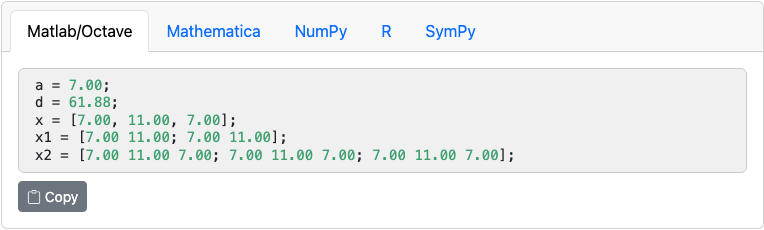
question.html
<pl-variable-output digits="3">
  <!-- Example comment inside of this element. -->
  <pl-variable params-name="matrixC">C</pl-variable>
  <pl-variable params-name="matrixD">D</pl-variable>
</pl-variable-output>
server.py
import prairielearn as pl
import numpy as np

def generate(data):

    # Create fixed matrix
    matrixC = np.matrix("5 6; 7 8")
    matrixD = np.matrix("-1 4; 3 2")
    # Random matrices can be generated with:
    # mat = np.random.random((2, 2))

    # Export each matrix as a JSON object for the question view.
    data["params"]["matrixC"] = pl.to_json(matrixC)
    data["params"]["matrixD"] = pl.to_json(matrixD)
定制
<pl-variable-output> 的属性:
| 属性 | 类型 | 默认 | 描述 |
|---|---|---|---|
default-tab |
"matlab"、"mathematica"、"numpy"、"r"、"sympy" |
"matlab" |
选择活动选项卡。 |
digits |
整数 | 2 | 小数点后显示的位数。 |
show-mathematica |
布尔 | 真实 | 切换 Mathematica 选项卡的显示。 |
show-matlab |
布尔 | 真实 | 切换 Matlab 选项卡的显示(也与 Octave 兼容)。 |
show-numpy |
布尔 | 真实 | 切换 NumPy 选项卡的显示。 |
show-r |
布尔 | 真实 | 切换 R 选项卡的显示。 |
show-sympy |
布尔 | 真实 | 切换 SymPy 选项卡的显示。 |
<pl-variable> 的属性(每个要显示的变量的属性之一):
| 属性 | 类型 | 默认 | 描述 |
|---|---|---|---|
comment |
字符串 | — | 在显示的变量之后添加注释。 |
digits |
整数 | 2 | 变量小数点后显示的位数。默认为封闭的 <pl-variable-output> 上设置的 digits 值。 |
params-name |
字符串 | — | 要显示的 data["params"] 中的变量名称。必需的。 |
从已弃用的属性迁移
为了向后兼容,仍支持以下已弃用的属性和值:
| 旧语法 | 新语法 |
|---|---|
default-tab="python" |
default-tab="numpy" |
show-python="false" |
show-numpy="false" |
show-python="true" |
show-numpy="true" |
pl-matrix-output 是 pl-variable-output 的已弃用别名。它仅支持 Matlab 和 NumPy 选项卡,并且始终默认为 Matlab 选项卡。请改用 pl-variable-output。
旧版 <variable> 子标签仍被接受为 <pl-variable> 的已弃用别名。请改用 <pl-variable>。
细节
此元素显示 <pl-code> 标签内的变量列表,这些变量的格式设置为导入到 MATLAB、Mathematica、NumPy、R 或 SymPy(用户可以在它们之间切换)。每个变量必须是标量或二维 numpy 数组(表示为列表)。每个变量将以 <pl-variable> 和 </pl-variable> 标记之间出现的文本为前缀,后跟 =。以下是每个语言选项卡下显示的格式示例。
MATLAB 格式:
A = [1.23; 4.56]; % matrix
数学格式:
A = [1.23; 4.56]; (* matrix *)
NumPy 格式:
import numpy as np

A = np.array([[1.23], [4.56]]) # matrix
R 格式:
A = c(1.23, 4.56) # vector
A = matrix(c(1.23, 4.56, 8.90, 1.23), nrow = 2, ncol = 2, byrow = TRUE) # matrix
符号格式:
from sympy import *

A = Matrix([[1.23], [4.56]]) # matrix
如果变量 v 是复杂对象,则应使用 import prairielearn as pl 和 data["params"][params-name] = pl.to_json(v)。
示例实现
- [元素/变量输出]
- [元素/矩阵组件输入]
- [演示/矩阵复代数]
参见
pl-matrix-latex用于使用 LaTeX 命令显示矩阵。pl-matrix-component-input用于矩阵中每个元素的单独输入框pl-matrix-input表示以支持的编程语言格式化的输入值。pl-code显示带有语法突出显示的代码块